
KDP Made Easy: How to Publish Your Book in 10 Steps
Ever wished that you could become a Published Writer? Perhaps there’s a story within you that’s threatening to burst forth, or you’re an expert about something people should understand. The best news? Well, the reason publishing your own book for the first time has never been as simple as it is today: Kindle Direct Publishing (KDP).
No longer do you have to go through a traditional publisher to get your book into the hands of readers. You can publish with KDP for free and start making money on day one! This platform is already being used by millions of writers around the world to share their writing with readers.
This guide will take you through 10 simple steps to self-publish your first book on KDP. You may be writing fiction, non-fiction or even a children’s book and still use these guidelines to help you along the process. By the time you are finished reading, you will have all the information you need to be published.
Step 1: Writing and Polishing Your Manuscript
Before you can publish anything, however, you first need a book to self-publish. This may sound like a no-brainer, but lots of people try to “publish” before their manuscript is really ready.
Getting Your Story Down
Then, write your first draft. Don’t get hung up on doing it perfectly — just get your ideas down on paper. Have a daily writing goal — 500 words, say — and stick to it. A lot of very extraordinary authors write their books in 30-60 days with the method here.
The Magic of Editing
After you’re finished with your first draft, it’s time for editing. This process involves:
Editing tip: Read your work and correct what’s obvious
Beta readers: Get friends or family members to review and provide feedback
Professional editing: For special projects, think about hiring an editor
Remember, readers expect quality content. A book filled with spelling errors and grammatical mistakes will receive bad reviews that can damage your sales.
Formatting Basics
You should format your manuscript before submitting it. Use:
- Common fonts like Times New Roman or Arial
- Double spacing
- Clear chapter breaks
- Consistent heading styles
Step 2: Create a Killer Book Cover
Your book cover is a movie poster – it has to get people’s attention and make them want to find out more. Research indicates that readers make a decision to purchase within 8 seconds of seeing a book cover.
DIY Cover Design
If you’re working on a budget, you can make your own cover with any of these services:
- Canva
- GIMP
- Adobe Photoshop
- KDP’s Cover Creator (free tool)
Professional Cover Design
It’s even better to hire a graphic designer for best results. Websites like:
- Fiverr
- 99designs
- Reedsy
- SelfPubBookCovers
Professional covers run between $200 and $800 but can make a big difference in the sales of your book.
Cover Design Tips
| Element | Best Practice |
|---|---|
| Title | Large, bold and easy to read text |
| Colors | Reflect genre chosen |
| Image | High res (300+ DPI) |
| Text | Clear at thumbnail size |
| Genre | Sub category conventions |
Step 3: Create Your KDP Account
It is absolutely free and easy to do it yourself. You’ll need:
- A valid email address
- Bank account information for payments
- Tax Info (W-9 for US based, W-8 international)
- Phone number for account verification
Account Verification Process
Amazon takes account security seriously. You might need to provide:
- Government-issued ID
- Bank statements
- Proof of address
That process typically takes 24-48 hours, so don’t leave it until the last minute.
Step 4: Select Your Book Categories and Keywords
Choosing the right categories and keywords is important because it’s how readers will find your book. This is a step that has direct implications for how well your book will sell.
Picking Categories
You may select up to two primary genres for your book. Check research bestseller lists in some possible categories, and you’ll see:
- How competitive they are
- Which books sell best
- If your book is category perfect
Keyword Research
You have only 7 keywords or search phrases in KDP. Use tools like:
- Amazon search suggestions
- Publisher Rocket
- KDP Rocket
- Google Keyword Planner
Focus on keywords that describe:
- Your book’s topic
- The target audience
- Similar successful books
Step 5: Create an Authoritative Book Description
Say you’ve written a fresh and engrossing book, scratch your head that nobody’s buying it. Get in control with writing portfolio.
The book blurb is essentially a sales pitch. It has to hook the reader and induce them to buy your book. Most readers spend fewer than 30 seconds reading descriptions, so you want to make each word count.
Description Structure
Follow this proven formula:
Hook (1-2 sentences): Begin with a statement that catches the readers’ interest.
Conflict (2-3 sentences): What is the problem or conflict in your book?
Solution/Story (3-4 sentences): What’s the story behind your book?
CTA (1 sentence): Tell them to purchase
Formatting Your Description
Make your description come to life with HTML format:
- Bold text for emphasis
- Italic text for titles
- Line breaks for readability
Social Proof
If you have qualifications, honors or endorsements, try to note those without elaborating. It’s a way to instill trust in potential readers.
Step 6: Price Your Book Strategically
The price you set for your book can be the difference between success and failure. Set it too high and people won’t buy. Too low, and it might seem poor quality.
KDP Royalty Options
KDP offers two royalty options:
| Royalty Rate | Price Range | File Delivery Cost |
|---|---|---|
| 35% | $0.99 – $200 | None |
| 70% | $2.99 – $9.99 | Yes (small fee) |
Pricing Strategies
New Author Strategy: $2.99-$4.99 to get readers
Established Author Strategy: $4.99-$9.99 based on length and perceived value
Promotional Strategy: Start at $0.99, raise the price
Market Research
Compare prices of other similar books in your category. Be competitive and consider the value of your book.

Step 7: Upload Your Files
And now the technical part: how to upload your manuscript & cover files to KDP.
File Requirements
Manuscript:
- Accepted File Types: DOC, DOCX, PDF, HTML
- Recommended: PDF for more control over the formatting
- File size: Up to 650 MB
Cover:
- Format: JPEG or PDF
- Resolution: 300 DPI minimum
- Size: The height is 1.6 times the width
Upload Process
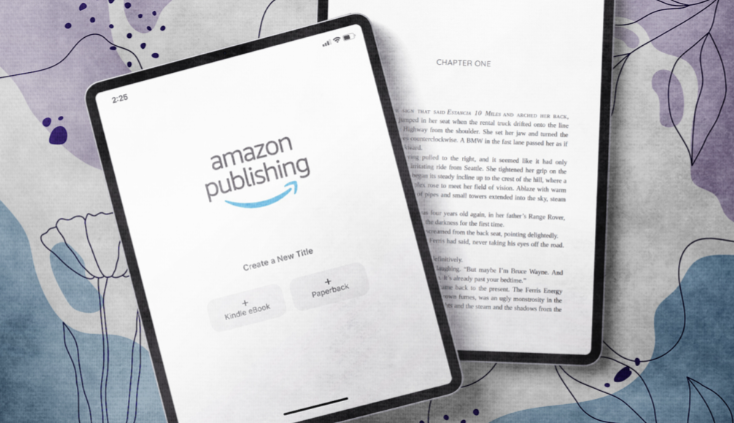
- Log into your KDP account
- Click “Create a New Title”
- Fill in book details
- Upload manuscript file
- Upload cover file
- Preview your book with the KDP previewer
Common Upload Issues
Formatting issues: Use KDP’s book formatting guide
File size is too high: Include images and compress them in the manuscript
Incorrect size: Review dimensions and aspect ratio
Step 8: Configure Distribution Settings
KDP has several distribution options which impact where your book is sold and how.
Geographic Distribution
You can decide how to distribute your book:
- Worldwide
- Specific countries only
- Exclude certain countries
The best exposure comes from worldwide distribution, which is usually selected by most authors.
Digital Rights Management (DRM)
Copy protection, or DRM, is used to inhibit unauthorized copying of your book. Consider:
Pros: Prevents piracy
Cons: Can annoy paying customers
A lot of successful authors forgo DRM; if someone is determined to bypass it they will, and all that you do is annoy those of your readers who paid for their copy.
Kindle Unlimited and KDP Select
KDP Select is an optional program that includes:
- Higher royalties in certain countries
- Inclusion in Kindle Unlimited
- Access to promotional tools
(Your ebook must be exclusive — it cannot be available on any other platform)
Step 9: Review and Publish
Before you press share, proofread everything again.
Final Checklist
- [ ] Book title and subtitle are exactly as they appear on the actual book
- [ ] Name of the author is spelled correctly
- [ ] Description of the book is compelling and free of typos
- [ ] Categories and tags are optimized
- [ ] Price is competitive
- [ ] Cover looks professional
- [ ] The manuscript is well formatted
- [ ] All required information has been entered
The Publishing Process
When you click “Publish Your Kindle eBook”:
Review Time: Once your book is submitted, Amazon reviews it (typically 24-72 hours)
Live Update: Your book is live on Amazon
Global Distribution: Available in Amazon international stores
Search Indexing: Is discoverable on Amazon
What Happens After Publishing
Your book will be ready to purchase within 72 hours. When it’s live you will receive an email confirmation.
Step 10: Promote Your Published Book
Getting your book published is just the start. Now it’s time to tell people that it even exists.
Launch Week Strategy
Your first week is all about momentum:
- Spread the word: Friends, family, social media followers
- Request reviews: Reach out to people who promised they would support you
- Join groups: Facebook groups, Reddit communities
- Create buzz: Share behind-the-scenes content
Long-term Marketing
Social Media Marketing:
- Share quotes from your book
- Post about your writing journey
- Discuss with readers and other authors
Email Marketing:
- Grow an email list of potential readers
- Send updates about new books
- Post useful info relating to your book’s topic
Content Marketing:
- Launch a blog about the subject of your book
- Guest post on other websites
- Create YouTube videos or podcasts
For more comprehensive strategies on building your author platform and connecting with readers, Reading Awakening offers valuable insights for aspiring and established authors alike.
Amazon-Specific Marketing
Amazon Advertising:
- Sponsored product ads
- Lockscreen ads
- Kindle Direct Publishing ads
Optimization:
- Monitor your keywords and categories
- Revise your book description according to any feedback from readers
- If sales are slow, A/B test with a few different covers
Building Author Platform
Think Long-Term for Author Brand Building
- Author Website: Get a professional website built
- Author Biography: Learn to write book descriptions that are optimized and avoid common mistakes
- Social Media Presence: Show up and Be You
- Relate to Readers: Reply to reviews and comments
- More Than One Book: Strategize your next book while promoting your present one
Bonus Tips for Success
Track Your Performance
The KDP comes with a complete reporting and monitoring tool suite so that users can analyze their sales. Monitor:
- Daily sales numbers
- Geographic performance
- Keyword ranking
- Review ratings and feedback
Stay Connected with Readers
The key to long-term success lies in building a relationship with your audience:
- Respond to reviews professionally
- Engage on social media
- Consider starting an email newsletter
- Solicit feedback on ideas for a future book
Keep Learning
The publishing world changes quickly. Stay updated by:
- Following publishing blogs and podcasts
- Joining author communities
- Attending virtual conferences
- Reading books about the business of marketing and publishing
For comprehensive resources and guides on publishing, consider visiting the official Kindle Direct Publishing website for the most up-to-date information and tools.
Common Mistakes to Avoid
Rushing the Process
A lot of new writers are so eager to publish that they jump ahead. Take time to:
- Properly edit your manuscript
- Create a professional cover
- Write a compelling description
- Research your market
Ignoring Genre Conventions
Each genre has expectations for:
- Cover design
- Pricing
- Book length
- Content style
Know the Genre You’re Writing Before You Publish.
Setting Unrealistic Expectations
Most books are not overnight best sellers. Self-publishing success tends to stem from:
- Publishing multiple books
- Building an audience over time
- Continuously improving your craft
- Learning from each book’s performance
Your Publishing Journey Starts Now
Launching your first book with KDP is an exciting time but it’s the start of a long road as an author. Every single successful author was right where you are today – with a dream and a story.
Keep in mind that publishing is an art and a business, too. The creative part is the writing of stories, and the other half is marketing, building an audience, learning it all over again. The most successful self-publishers write up to one book a month.
Don’t be discouraged if your first book does not instantly rock it as a best-seller. Let this be a learning opportunity. Notice what does work for you and what doesn’t. Read the good reviews and make your next book better. Communicate with other writers who can provide support and advice.
The wonderful thing about KDP is after your book is published, it has the potential to make money for years to come. Long after you’ve written your next book, your first book continues to work for you 24/7, attracting new readers in markets across the globe.
Take action today. Your readers are waiting for the fresh story, or insight only you can share. The world needs your book, and KDP now makes it easier to share.
Frequently Asked Questions
Q: How much does it cost to publish through KDP? A: Publishing on KDP is totally free. You pay nothing unless you select optional services, such as professional editing or cover design. Amazon takes its share per sale as a fee.
Q: How long does it take for my book to go live? A: The majority of books are reviewed and published within 24-72 hours. But it may take up to a week during busy periods.
Q: Can I revise or update my book after it’s published? A: Yes, you can change your book’s content, cover, description, price and other information through your KDP account.
Q: Should I get an ISBN for my Kindle E-book? A: No, there’s a free ASIN (Amazon Standard Identification Number) from KDP for the digital book. Print books only require an ISBN, and KDP is happy to provide free ones for them as well.
Q: How do book sales get paid out? A: Amazon sends royalty payments approximately 60 days after the end of the month in which a sale was made. You can elect to receive your payout via direct deposit or check.
Q: Can I also sell this book on other platforms? A: Yes, unless you enroll in KDP Select; this makes your work exclusive to Amazon for 90 days. Outside of KDP Select, you have the freedom to publish anywhere.
Q: What are the differences between publishing an ebook and a paperback? A: Ebooks are digital files that can be read on devices such as Kindles or phones. Paperbacks are physical books printed as they’re ordered. It is the same book content.
Q: How do you deal with negative reviews? A: Turn criticism into the building blocks of your next book. Respond only in public if accurate misinformation needs correction.
Q: Should I hire a professional editor? A: It’s not necessary, but is very well recommended – it will enhance the quality of your book and please the reader. See it as an investment in your author career.
Q: How many books do I need to write to make good money? A: There’s no magic number, but most successful self-published authors have several books. If you have 3-5 good books, they will tend to earn more consistently than if you only had one.